Each of these powerful and yet easy-to-use tools creates dynamic hybrid objects. Adding any or all to Vectorworks'® already solid set of features will be a boost to any user's productivity. Click on the models below to learn how...
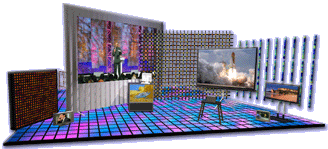
This is THE Plug-In suite that creates models of video devices - complete with easily-changeable screen images. This robust set of tools now includes the ability to create projection screens, blended screens, televisions and low-resolution LED arrays.
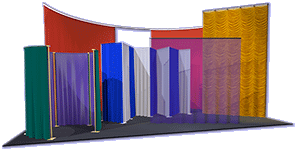
In addition to familiar curtain objects, this tool creates easily-resized models of curved curtains, scrims, and borders as well as straight pipe-and-drape runs - either from-scratch or based on existing geometry - effortlessly generating elements that are often difficult or tedious to build.
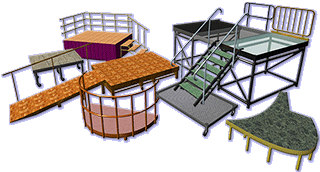
This is the most recently-updated member of the Landru Design Plug-In family, this 4-piece suite creates models of stage and riser sections, irregularly-shaped stage pieces, "stage-style" step units, and "stage-style" ramps. The flexible Staging ToolSet 2 models allow for quick on-the-fly changes.
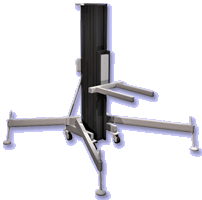
This simple and yet useful tool creates dynamic models of crank-style stage lifts. Unlike "static" symbols, StageLift models are easily reconfigured and can help in the tracking of project data.
more StageLift info - buy StageLift
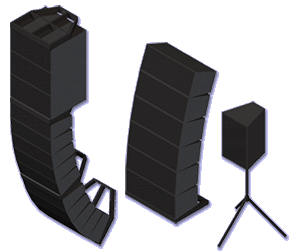
Filling a clear need for the Vectorworks® community, Audio Toolset 2 is a set of tools used to create simple, yet flexible, models of loudspeaker and flown or ground-stacked line-arrays. Click the link below to get more info on these, the FIRST audio Plug-In-Objects for Vectorworks®.
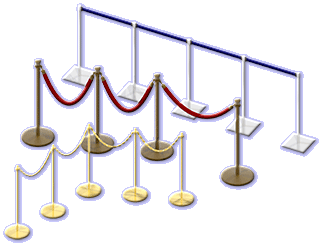
This tool creates easily-modified layouts of stanchions and associated belts, chains, and ropes - pieces that SEEM simple but that, without the tool, can be nerve-wracking to build and adjust.
more Stanchion Layout info - buy Stanchion Layout
Read on to get more information or tune in to our YouTube channel to see brief video introductions to some of the tools.
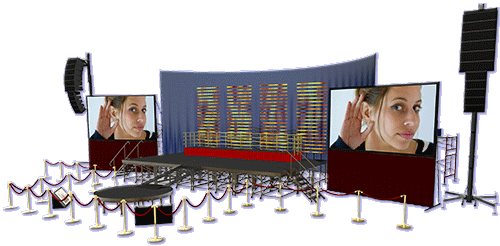
Containing ALL of these powerful Vectorworks® tools, our Producer's Pack 3 offers significant savings and the convenience of a single, time-saving, download.
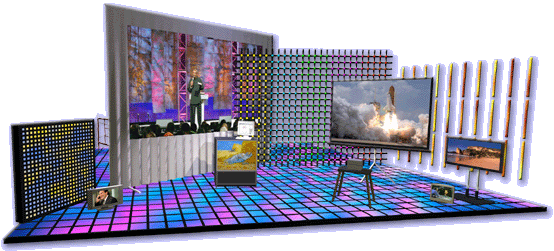
The 4 VideoScreen 4 tools, VS4-Projection, VS4-Television, VS4-LED, and VS4-Blended Screen, allow users to insert models of projection screens, edge-blended screens, plasma televisions, and LED tubes and tiles into their drawings.
These powerful VideoScreen 4 tools allow users to change, among other things, configuration, layout, and dimensions - easily and on-the-fly through Vectorworks'® familiar Object Info Palette.
Through the VIDEOSCREEN 4 Image Picker dialog, all of the VideoScreen 4 tools allow users to choose and adjust screen content quickly - without the usual hassle with texture mapping.
VideoScreen 4 comes with a collection of stock projector, stand, and television symbols. As with images, in VIDEOSCREEN 4, these models and users' custom symbols are easy to manage.
All of the VideoScreen 4 tools will place various text elements with custom labels - including screen/array dimensions, projection distances, and LED module counts - some in both 2D and 3D. Through a central text settings dialog things like visibility, color, size, and alignment are all independently changeable for each text element.
All of the VideoScreen 4 tools can automatically place their different parts in separate Vectorworks® Classes, allowing users to take advantage of Vectorworks'® Saved Views and graphic attributes.
VideoScreen 4 works any Vectorworks® version 2023 or newer - INCLUDING 2026 - and will run on both Windows and Mac computers. Spotlight® and Designer® are NOT required.
read on for more info or buy VideoScreen 4
VideoScreen
4 - Basic
(VS4-Projection
and VS4-Television)
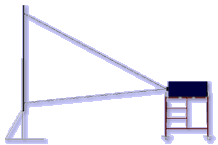
- Projection screens can be front or rear-projection and sizes can be infinitely defined - from 100% custom to one of several common rectangular aspects. Version 5 adds the ability to created tab-tensioned screens.
- Folding or tripod legs can be easily created - including screen dress kits with adjustable dimensions and softgoods details.
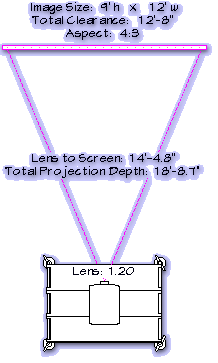
- Projectors can be placed in 2-D and 3-D space based on screen size and projector lens rating. Or, users have the option to specify a screen size and the projection distance and let VS4-Projection suggest a lens. Projectors can even be dragged to new locations and VS4-Projection will report back projection distances and the suggested lenses.
- Side-by-side and stacked projector configurations can be created.
- Users have different projector placement options, such as flown with a specified trim height, aligned with the screen, placed on the ground, or placed on floor stands. Projector(s) can be shifted side-to-side relative to the screen.
- A "Coverage Zone" feature can be used to aid users in the sizing and placing of screens.
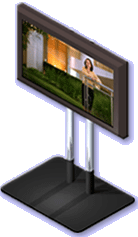
- Models of plasmas, LCDs, and CRTs can be inserted. Several stock models are included and custom models can be easily added.
- Portrait and landscape-oriented plasma models can be inserted.
- Adjustable stands (stock and...NEW: "custom") can be included for certain models.
- A "Coverage Zone" feature can be used to aid users in the sizing and placing of screens.
- TVs can be tilted on-the-fly for creating elements like DSMs.
VideoScreen
4Plus
(VS4-Projection,
VS4-Television, VS4-Blended Screen, VS4-LED,
VS4-Blended and
Projector)
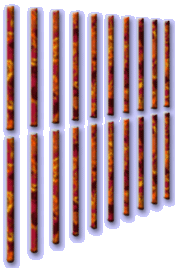
- Different module shapes can be created, including flat disks and tiles, tubes, domes, and capped tiles and disks.
- Arrays are generated based on module size and shape, module counts, module spacing, and/or array size.
- Images are mapped across the LED modules, taking into account "negative space" between modules.
- A "Coverage Zone" feature can be used to aid users in the sizing and placing of screens.
- End panel (module) edges can be mitered, making more seamless curved arrays.
- Array weights and wattages can automatically update as configurations change.
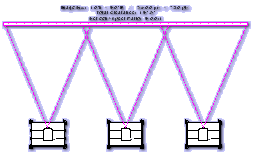
- NEW IN VERSION 5, VS4-Blended Screen will create both flat AND CURVED screens.
- Projectors can be placed based on a user-defined screen size, desired screen area count (also user-defined), and projector aspect. Or, NEW IN VIDEOSCREEN 4 is the option to specify a screen size and the projection distance and let VS4-Blended Screen suggest lenses.
- Valuable information is caclulated, like projector spacing and image overlap.
- NEW IN VERSION 5, VS4-Blended Screen will allows blending regions to be adjusted.
- Projectors (VS4-Blended Projector) are independent "child" objects of the screen, allowing separate text display and position settings. When you drag, rotate, or update a VS4-Blended Screen object, the associated projectors move, rotate, or update with it.
- A "Coverage Zone" feature can be used to aid users in the sizing and placing of screens.
Download the VideoScreen 4 Manual for more details on other features and more information on using these tools.
View this movie to see how easy it is to create custom televisions, projectors, and projector stands.
Feedback From VideoScreen Users
"It is the single
biggest time saver that I use in Vectorworks."
M. Herring
Herring Productions
"I'm impressed.
I have gone from having over 30 symbols for various video equipment to
just using your tool."
A. Candeloro
Sightline
"This tool
has become invaluable in the very short time I have been using it. As
a Project Manager, the burden of drawing projector positions falls on
me quite often. This has made all of the difference in the world."
A. Richards
Creative Technology
"Brilliant!!
This is amazingly useful."
M. Ohran
Echo Productions
"A fantastic
time saver."
D. Ormsby
Design One Technical Solutions
"...the upgraded
version is a huge leap forward for an already great product...well worth
the money in the time you save drawing screens..."
M. Jimmyer
Paradise Show & Design
"...the tool
is fantastic and a great help in our CAD plans."
G. Hackett
Haycom Staging
"I used to
spend a fair amount of time placing video projectors and screens. With
VideoScreen it is a snap. ...My clients really like seeing the
screens appropriately placed with real content... Very slick!"
K. Montagne
Litkam, Inc.
We're excited that versions of the VideoScreen 4 tools are now part of Spotlight® - starting with the 2010 version and continuing on in the newest, Spotlight 2026®. You'll want to spend some time watching the Entertainment Design in VW Spotlight Webinar that demonstrates how Spotlight's Event Planning tools (including the VideoScreen tools) work together to streamline the preparation for events.
That
being said, the
Landru Design versions of the VideoScreen 4 tools on which so many
users have come to depend are still very-much alive. As
with our other tools, users will find that VideoScreen 4
provides even more value, giving you great reasons to purchase,
upgrade, and continue to use the tools. Three of those reasons include:
1) VideoScreen
4 's running in any Vectorworks package version 2023® or newer - including
2026. Spotlight®
and Designer® are NOT required.
2) Faster turn-around on fixes and future modifications.
3) Feature additions as the tool continues to evolve.
The
cost of the Basic version of VideoScreen 4 is $68US.
The Basic version of VideoScreen 4 includes VS4-Television,
VS4-Projection, and the supporting collection
of models and stock screen images.
The
cost of VideoScreen 4Plus is $136US.
VideoScreen 4Plus includes VS4-Television,
VS4-Projection, VS4-Blended
Screen, VS4-Blended
Projector, VS4-LED,
and the supporting collection of models and stock screen images.
The cost of upgrading from the Basic version of VideoScreen 4 to VideoScreen 4Plus is $68US.
VideoScreen 4 version 5.21 is available free-of-charge to users who purchased previous-version licenses on or after September 10, 2024. If you qualify, please contact us for download information. You'll need to provide the last six characters of your Vectorworks® serial number. For all other VideoScreen users, upgrade discounts are listed below.
Choose the license you wish, enter the last six characters of your Vectorworks® serial number, and click the button below to make your purchase. Assuming you enter the requested information and pay using a credit card or direct-deposit, you will receive an e-mail within one business day for a link to a download page, a password, and a license key.
(Please note that eChecks take 3-4 business days to clear.)
Before
you purchase, remember that the VideoScreen 4
tools only
with Windows
and Mac Vectorworks
2023® or newer, including 2026.
Refunds are not given because of version incompatibility.
VideoScreen was an original idea of C. Andrew Dunning of Landru Design - with endless gratitude to Gerard Jonker of Jonker&Wu for his enabling the initial vision to become reality.

(Top - VideoScreen 4 - SoftGoods 2 - Staging ToolSet 2 - StageLift - Stanchion Layout - Producer's Pack 3 - Audio ToolSet 2)
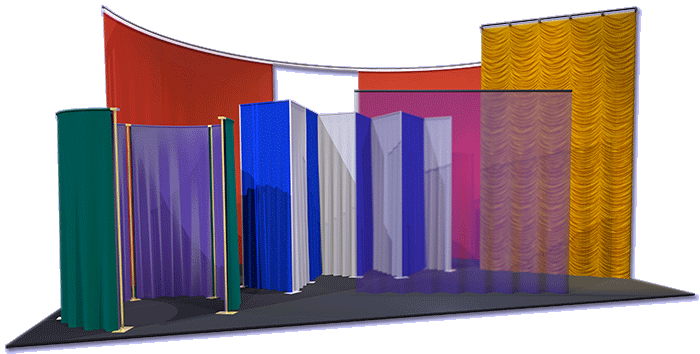
SoftGoods 2 is a Vectorworks® Plug-In Object that allow users to insert models of straight and curved curtains, borders, and pipe-and-drape runs in their drawings - either from-scratch or based on existing geometry.
SoftGoods 2 is a Path Plug-In Object that can create single AND multi-segment objects (straight and curved), similar to Vectorworks'® Polylines.
SoftGoods 2 models can be easily resized by dragging Control Points and making adjustments in Vectorworks'® familiar Object Info Palette.
Other things like curtain height, trim, curtain openings, panel overlap, track visibility and pleat sizing can also be changed on-the-fly.
For all SoftGoods 2 model parts, textures are automatically created and applied - including opaque drapery and scrims - in addition to applying, scaling, and positioning custom images. 2016 heralds a new relationship with Rose Brand®, allowing us to offer textures representative of theirfabrics. The SoftGoods 2 download package now includes sample custom textures, as well as a selection of popular Rose Brand® fabrics, optimised for Vectorworks 2016 and newer.
For pipe-and-drape runs, the tool calculates spacing and tracks slider lengths and hardware and drape counts.
Select text can be displayed in each SoftGoods 2 instance.
NEW in version 2.55, SoftGoods 2's pipe-and-drape mode is greatly improved, offering a "Non-Sleeve" option for modeling systems similar to those offered by Wentex® and a new feature making creating arched openings easier.
-
We're
excited that a version of SoftGoods 2 is part of Spotlight®,
starting with version 2012. As with our other tools, users will find that
SoftGoods 2 provides even more value, giving you
great reasons to purchase, upgrade, and continue to use the tool. Three
of those reasons include:
1) SoftGoods
2's running in any Vectorworks package version 2023® or newer - including
2026. Spotlight®
and Designer® are NOT required.
2) Faster turn-around on fixes and future modifications.
3) Feature additions as the tool continues to evolve.
-
Please download the SoftGoods 2 Manual for more information and detailed instructions on using the tool.
-
SoftGoods 2 only with Windows and Mac Vectorworks 2023® or newer, including 2026.
The cost of SoftGoods 2 is $48US.
SoftGoods
2 version 2.55 is available free-of-charge to users who purchased
previous-version licenses on or after September 10, 2024. If you qualify,
please contact us for download information.
You'll need to provide the last six characters of your Vectorworks®
serial number. For all other SoftGoods
users, an upgrade discount is listed below.
Choose the license you wish, enter the last six characters of your Vectorworks® serial number, and click the button below to make your purchase. Assuming you enter the requested information and pay using a credit card or direct-deposit, you will receive an e-mail within one business day for a link to a download page, a password, and a license key.
(Please note that eChecks take 3-4 business days to clear.)
Before
you purchase, remember that SoftGoods
2 only
with Windows
and Mac Vectorworks
2023® or newer, including 2026.
Refunds are not given because of version incompatibility.
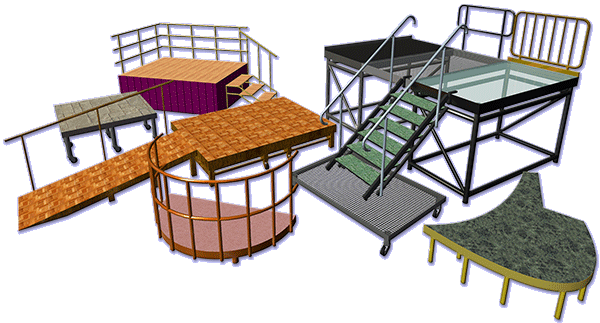
Staging ToolSet 2 is our set of Vectorworks® Plug-In Objects that allows users to insert models of stage sections and risers, irregularly-shaped stage pieces, "stage-style" step units, and "stage-style" ramps. The tools are called "StageDeck 2," "StagePlug 2," "StageSteps 2," and "StageRamp 2."
Staging ToolSet 2 model elements can be easily reconfigured through Vectorworks'® familiar Object Info Palette and include settings like dimensions (depth, width, radius, and height), structure (legs, fixed frame, and folding), and castor and rail inclusion.
All of the Staging ToolSet 2 model parts for all of the objects are fully textured and custom textures can be easily assigned.
All of the Staging ToolSet 2 model parts for all of the objects can be assigned to separate Vectorworks® Classes, allowing users to take advantage of Vectorworks'® ability to control texture assignment by-Class.
All of the Staging ToolSet 2 can display embedded text - such as heights and dimensions. Select object dimensions can be shown in multiple unit types (for example, in Inches and Millimeters).
StageDeck 2 can create rectangular or round decks.
StageDeck 2, StageSteps 2, and StageRamp 2 can create railings with multiple options.
StageRamp 2 can create ramps based on ramp floor length, actual ramp length, ramp angle, ramp rise:run ratio, or ramp grade.
-
We're
excited that a version of Staging ToolSet 2 is part of Spotlight®,
starting with version 2015. As with our other tools, users will find that
Staging ToolSet 2 provides even more value, giving
you great reasons to purchase, upgrade, and continue to use the tool.
Three of those reasons include:
1) Staging
ToolSet 2's running in any Vectorworks package version 2023® or newer
- including 2026. Spotlight®
and Designer® are NOT required.
2) Faster turn-around on fixes and future modifications.
3) Feature additions as the tool continues to evolve.
-
The Staging ToolSet 2 tools work with Windows and Mac Vectorworks 2023® or newer, including 2026.
The cost of Staging ToolSet 2 is $48US.
Staging
Toolset 2 version 2.442 is available free-of-charge to users who purchased
previous-version licenses on or after September 10, 2024. If you qualify,
please contact us for download information.
You'll need to provide the last six characters of your Vectorworks®
serial number. For all other Staging
Toolset
users, an upgrade discount is listed below.
An
upgrade discount is offered to users of previous Staging ToolSet
versions.
Choose the license you wish, enter the last six characters of your Vectorworks® serial number, and click the button below to make your purchase. Assuming you enter the requested information and pay using a credit card or direct-deposit, you will receive an e-mail within one business day for a link to a download page, a password, and a license key.
(Please note that eChecks take 3-4 business days to clear.)
Before
you purchase, remember that the Staging ToolSet 2
tools only
with Windows
and Mac Vectorworks
2023® or newer, including 2026.
Refunds are not given because of version incompatibility.
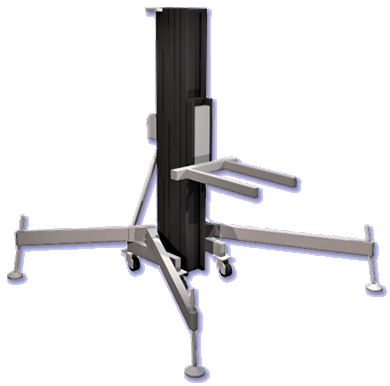
StageLift is a Vectorworks® Plug-In Object that allows users to insert models of crank-style stage lifts (similar to the "real" products offered by Genie® and Sumner®) in their drawings.
Fork height, width, and position are easily changed through Vectorworks'® familiar Object Info Palette.
Select text can be displayed in each StageLift instance.
-
We're
excited that a version of StageLift is part of Spotlight®,
starting with version 2015. As with our other tools, users will find that
StageLift provides even more value, giving you great
reasons to purchase, upgrade, and continue to use the tool. Three of those
reasons include:
1) StageLift's
running in any Vectorworks package version 2023® or newer - including
2026. Spotlight®
and Designer® are NOT required.
2) Faster turn-around on fixes and future modifications.
3) Feature additions as the tool continues to evolve.
-
StageLift only works with Windows and Mac Vectorworks 2023® or newer, including 2026.
The cost of StageLift is $26US.
StageLift
version 1.35 is available free-of-charge to users who purchased previous-version
licenses on or after September 10, 2024. If you qualify, please contact
us for download information. You'll need to provide the last six
characters of your Vectorworks® serial number. For
all other StageLift
users, an upgrade discount is listed below.
Choose the license you wish, enter the last six characters of your Vectorworks® serial number, and click the button below to make your purchase. Assuming you enter the requested information and pay using a credit card or direct-deposit, you will receive an e-mail within one business day for a link to a download page, a password, and a license key.
(Please note that eChecks take 3-4 business days to clear.)
Before
you purchase, remember that StageLift
only works with Vectorworks
2023® or newer, including 2026.
Refunds are not given because of version incompatibility.
(Top
- VideoScreen
4
-
SoftGoods
2
-
Staging ToolSet 2
- StageLift
- Stanchion
Layout -
Producer's Pack 3
- Audio
ToolSet 2)
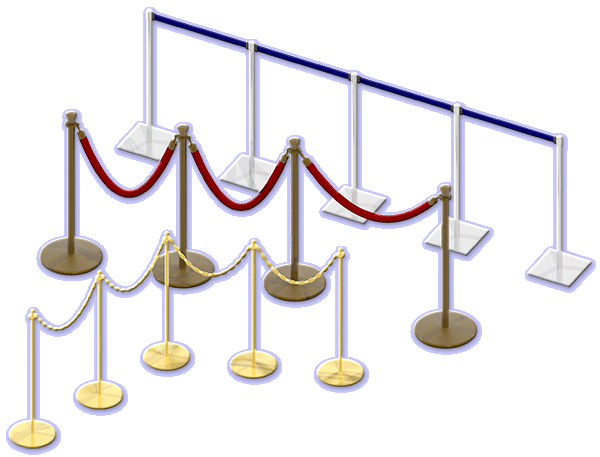
Stanchion
Layout creates easily-resized models of layouts of stanchions and
associated belts, chains, ropes - effortlessly generating frequently
tedious to build and modify.
Many aspects of the object geometry are adjustable on-the-fly, such as stanchion base and post dimensions; belt, rope, and chain dimensions; and stanchion spacing.
All 3D model elements are automatically textured. 3D colors and textures are chosen and applied directly through a familiar "3D Options" dialog, which displays thumbnails of available textures. Several stock Textures are generated on-the-fly. The tool recognizes textures in the current drawing, as well as Vectorworks® and Spotlight® defaults.
The different parts of each Stanchion Layout object can be assigned to different Classes and users can choose which parts are assigned to Classes and can define custom Class names.
Select text can be shown on drawings and various data, such as part counts, can be tracked in WorkSheets and Reports.
-
We're
excited that a version of Stanchion Layout is part of Spotlight®,
starting with version 2018. As with our other tools, users will find that
Stanchion Layout provides even more value, giving
you great reasons to purchase, upgrade, and continue to use the tool.
Three of those reasons include:
1) Stansion
Layout's running in any Vectorworks package version 2023® or newer
- including 2026. Spotlight®
and Designer® are NOT required.
2) Faster turn-around on fixes and future modifications.
3) Feature additions as the tool continues to evolve.
-
Stanchion Layout works with Windows and Mac Vectorworks 2023® or newer, including 2026.
The cost of Stanchion Layout is $26US
Stanchion Layout version 1.12002 is available free-of-charge to users who purchased previous-version licenses on or after September 10, 2024. Please contact us for download information. You'll need to provide the last six characters of your Vectorworks® serial number.
Enter the last six characters of your Vectorworks® serial number and click the button below to make your purchase. Assuming you enter the requested information and pay using a credit card or direct-deposit, you will receive an e-mail within one business day for a link to a download page, a password, and a license key.
(Please note that eChecks take 3-4 business days to clear.)
Before
you purchase, remember that Stanchion Layout
only
works with Windows
and Mac Vectorworks
2023® or newer, including 2026.
Refunds are not given because of version incompatibility.
(Top - VideoScreen 4 - SoftGoods 2 - Staging ToolSet 2 - StageLift - Stanchion Layout - Producer's Pack 3 - Audio ToolSet 2)
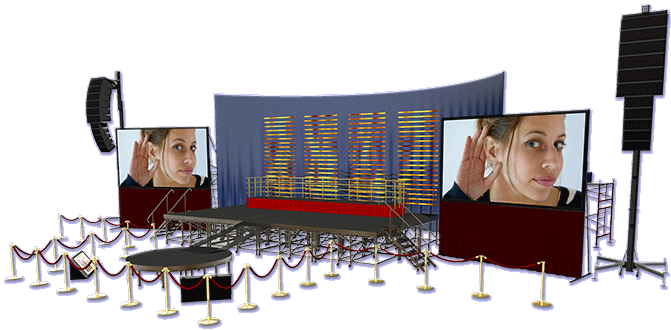
Producer's Pack 3
Our Producer's Pack 3 contains all of these powerful Vectorworks® Plug-In Objects: VS4-Projection, VS4-Television, VS4-Blended Screen, VS4-Blended Projector, VS4-LED, SoftGoods 2, StageDeck 2, StagePlug 2, StageSteps 2, StageRamp 2, StageLift, Stanchion Layout, AudioBox 2, Audio Array 2, and the free LandruNoteBox tool in one time and money-saving download.
The
cost of Producer's Pack 3 is $242US.
(an over $360US value!)
Producer's Pack 3 version "Oa" is available free-of-charge to users who purchased previous-version licenses on or after September 10, 2024. If you qualify, please contact us for download information. You'll need to provide the last six characters of your Vectorworks® serial number. For all other Producer's Pack users, an upgrade discount is listed below.
Choose the license you wish, enter the last six characters of your Vectorworks® serial number, and click the button below to make your purchase. Assuming you enter the requested information and pay using a credit card or direct-deposit, you will receive an e-mail within one business day for a link to a download page, a password, and a license key.
(Please note that eChecks take 3-4 business days to clear.)
Before you purchase, remember that the tools only work with Windows and Mac Vectorworks 2023® or newer, including 2026. Refunds are not given because of version incompatibility.
(Top - VideoScreen 4 - SoftGoods 2 - Staging ToolSet 2 - StageLift - Stanchion Layout - Producer's Pack 3 - Audio ToolSet 2)
(Top - VideoScreen 4 - SoftGoods 2 - Staging ToolSet 2 - StageLift - Stanchion Layout - Producer's Pack 3 - Audio ToolSet 2)
For information on Vectorworks:

Other Developers' Offerings
Other developers have also created tools to energize Vectorworks® users' drawing experience:
BeamViz and Source 4 Savvy Section from Benghiat Lighting are valuable tools for making stage lighting calculations and creating detailed Source 4 elevation models.
Tools for Spotlight and Chain Hoist Tools from AutoPlot are indespensible tools for manipulating Spotlight elements and adding rigging elements to drawings.
SoftSymbols from FieldTemplate is an expansive lighting symbol package - including not only symbol geometry, but also thorough fixture data.
ArchonCAD has created an extensive line of training manuals, guides, and tutorials that can be invaluable to users of all levels.
LRA Designs offers an broad array of in-depth Spotlight and general Vectorworks training videos.
(Top - VideoScreen 4 - SoftGoods 2 - Staging ToolSet 2 - StageLift - Stanchion Layout - Producer's Pack 3 - Audio ToolSet 2)
