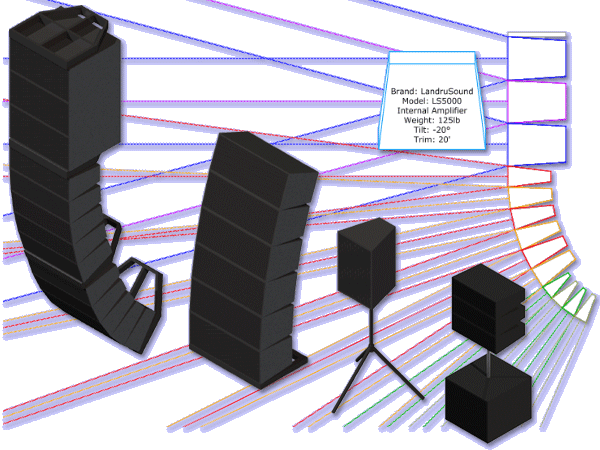
Audio ToolSet 2 is the FIRST set of audio Plug-In Objects for Vectorworks®.
This
pair of tools enables you to insert simple Hybrid (2D and 3D)
models of loudspeakers and flown or ground-stacked line arrays. While
they are not meant to replace (or even to approach the complexity of)
manufacturers' or 3rd-party high-end sonic analysis software, these
flexible tools are great for things like...:
- Performing basic audio coverage analysis.
- Creating audio system layout drawings.
- Checking general space requirements.
- Visualizing audio components for projects.
The Audio ToolSet 2 tools work with any VectorWorks® version 2023 or newer - INCLUDING 2026 - and will run on both Windows and Mac computers. Spotlight® and Designer® are NOT required.
Key Features
All of the tools...:
- Loudspeaker and bumper geometry can easily be changed on-the-fly based on user-defined specifications or the tools can insert existing Symbols.
- Regularly-used configurations can be saved in a library for later retrieval.
- The tools will help to track relevant information, like loudspeaker brand and model, weight, project location, purpose, drive line, trim height, wattages, and tilt angle (absolute and relative to other boxes). Most of this information can be displayed directly on drawings as text blocks.
AudioBox 2...:
- Can display variable symmetrical and asymmetrical dispersion areas (in both 2D and 3D) . The dispersion lines compensate for the project "floor" (the drawing Ground Plane) and a user-input listening height. Three independently-definable Dispersion Ranges can be defined so users can visualize loudspeaker performance for different frequency ranges, key frequencies, crossover points, or db drop-offs. Each range can be independently Classed and is color-coded.
- Can flip loudspeakers to "side-ways" orientation.
- Can create ceiling speakers.
- Can create adjustable tripods, stands, and yokes.
AudioArray 2...:
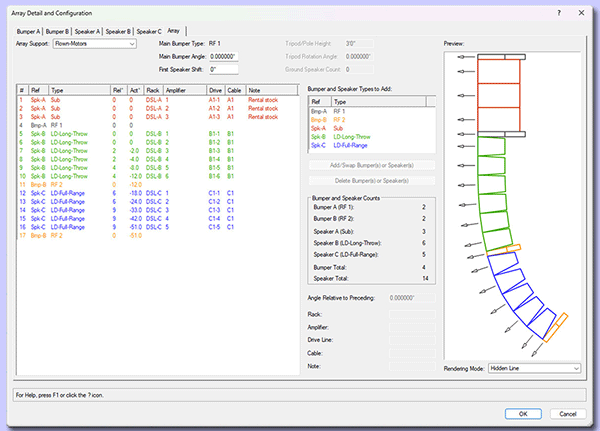
- AUDIOARRAY 2 features a user-friendly "Config Array..." dialog that includes automatically updated preview windows so users can instantly see what they're creating - bumpers, loudspeakers - or changes to the over-all array.
- Up to 42 loudpeakers and/or additional bumpers can be inserted in a given array and of up to three different loudspeaker types in each - for things like subs, underhangs, etc. Geometry and data for each loudspeaker type is totally independent of the others.
- Up to 3 different loudspeaker types and 2 different bumper types may be specified.
- Element-to-element angles are independent for each loudspeaker and/or additional bumper in the array.
- Will create flown, ground stacked, sub-pole, and tripod-based arrays...non-rectangular and "T"-shaped bumpers, and bumperless arrays.
- "Sub Pole" arrays can be created.
- Multiple data fields are included and information can be entered "in-bulk" through the "Config Array..." dialog.
- Users can choose different rendering modes for the preview boxes in the "Array Detail and Configuration" dialog.
View a brief AudioToolSet 2 movie or download the Audio ToolSet 2 Manual for detailed instructions as to how to use the tools.
We're excited that versions of the Audio ToolSet 2 tools are now part of Spotlight® - starting with the 2013 version. Like our other tools that have been incorporated into Spotlight®, the Audio ToolSet 2 tools on which so many users have come to depend are still very-much alive. We will continue keep them working in even non-Spotlight® versions of Vectorworks®, to add additional feaures, and to offer faster turn-around on future modifications. By continuing to support and to develop our versions of the tools, we're providing even more value, giving you great reasons to purchase, upgrade, and continue to use Audio ToolSet 2.
The
cost of the AudioToolSet 2 is $82US.
Audio Toolset 2 version 3.4401 is available free-of-charge to users who purchased previous-version licenses on or after September 10, 2024. If you qualify, please contact us for download information. You'll need to provide the last six characters of your Vectorworks® serial number. For all other Audio ToolSet users, an upgrade discount is listed below.
Choose the license you wish, enter the last six characters of your Vectorworks® serial number, and click the button below to make your purchase. Assuming you enter the requested information and pay using a credit card or direct-deposit, you will receive an e-mail within one business day for a link to a download page, a password, and a license key.
(Please note that eChecks take 3-4 business days to clear.)
Before you purchase, remember that the Audio ToolSet 2 tools only work with Vectorworks 2023® or newer, including 2026. Refunds are not given because of version incompatibility.
